Tools
Configure tools to require user approval before execution for enhanced control and safety
Tool approvals allow you to configure specific tools to require explicit user confirmation before execution. This provides enhanced control over potentially sensitive or destructive operations.
When a tool is configured to require approval:
Agent pauses execution when the tool is calledApproval request emitted in the data stream with tool detailsUser sees approval UI with tool name, arguments, and approve/deny optionsExecution continues only after user approvalTool executes normally with the original arguments
Configure tool approvals using the McpToolSelection format when defining agent tools:
import { agent , tool } from "@inkeep/agents-sdk" ; // Configure tools with approval requirements const weatherAgent = agent ( "weather-forecast" ) . prompt ( "You help users get weather information." ) . canUse ( tool ( "weather-mcp" ). with ({ selectedTools : [ "get_current_weather" , // No approval required { name : "get_weather_forecast" , needsApproval : true , // Requires user approval }, { name : "delete_weather_data" , needsApproval : true , // Requires user approval }, ], }) ); In the visual builder, configure tool approvals using the unified tool grid:
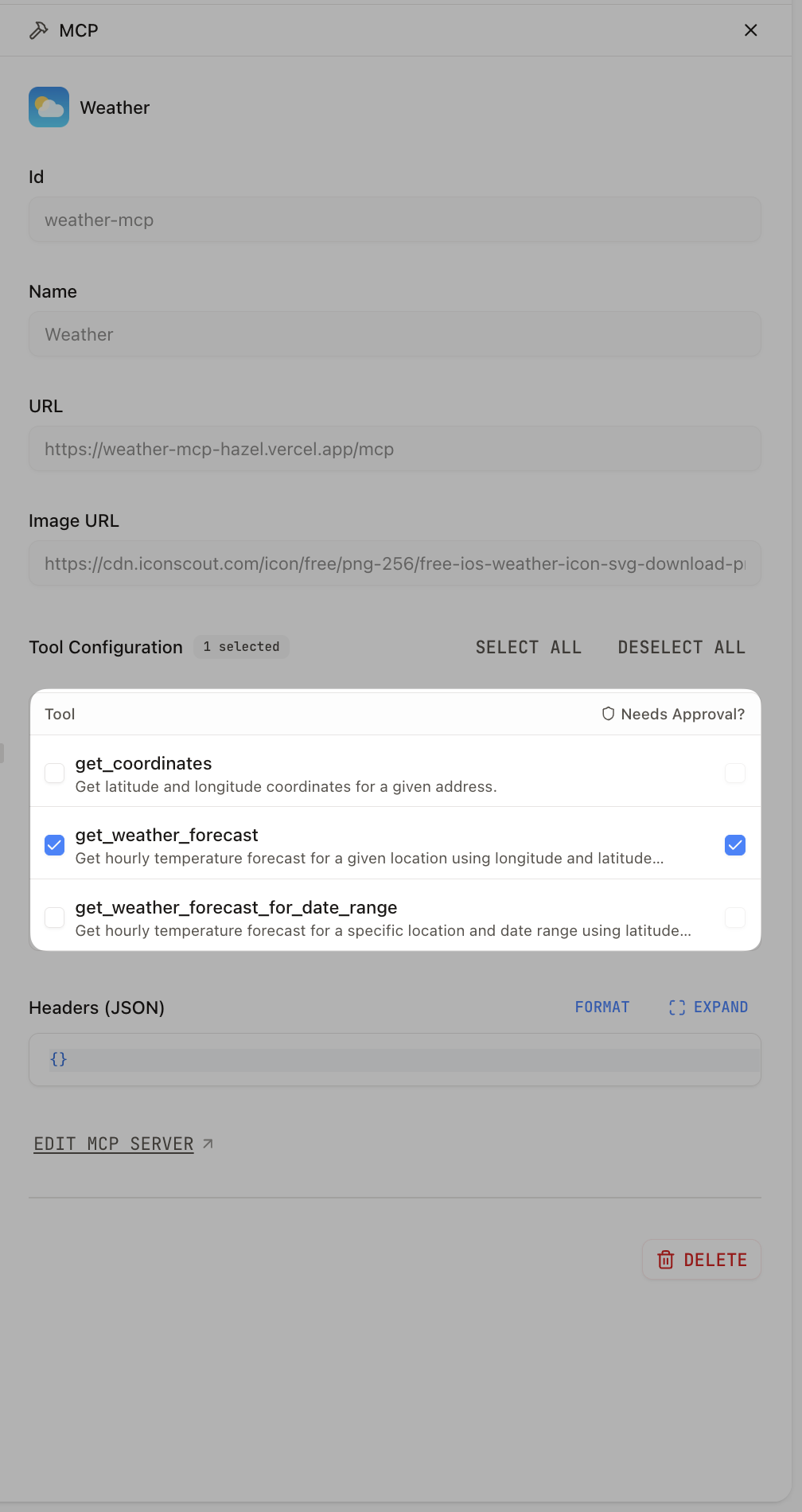
Navigate to your agent in the visual builderSelect an MCP tool node connected to your agentUse the tool configuration grid with two columns:
Tool column : Check to select/deselect toolsApproval column : Check to require approval (only enabled for selected tools)
When an agent encounters a tool requiring approval:
Approval Flow:
1. Agent calls tool → 2. Execution pauses → 3. Approval request emitted
                                                           ↓
6. Tool executes ← 5. Execution resumes ← 4. User approves
Denial Flow:
1. Agent calls tool → 2. Execution pauses → 3. Approval request emitted
                                                           ↓
6. Returns denial message ← 5. Execution resumes ← 4. User denies
The agent receives proper feedback in both cases, ensuring natural conversation flow.
Tool approval requests appear in the data stream as enhanced tool_call events:
{ "type" : "data-operation" , "data" : { "type" : "tool_call" , "label" : "Tool call: delete_weather_data" , "details" : { "timestamp" : 1726247200000 , "subAgentId" : "weather-agent" , "data" : { "toolName" : "delete_weather_data" , "input" : { "location" : "San Francisco" , "date_range" : "2024-01-01_to_2024-12-31" }, "toolCallId" : "call_abc123def456" , "needsApproval" : true , "conversationId" : "conv_xyz789" } } } } Key fields for approval handling:
needsApproval: true - Indicates approval is requiredtoolCallId - Unique identifier for this tool executionconversationId - Conversation context for the approval requestinput - Tool arguments for user review
Approved tools execute normally and return their actual results.
Denied tools return a clear message to the agent:
{ "type" : "tool_result" , "data" : { "toolName" : "delete_weather_data" , "output" : "User denied approval to run this tool: Operation too risky" , "toolCallId" : "call_abc123def456" } } This allows the agent to understand the denial and respond appropriately to the user.
Requires the same API key authentication as chat endpoints:
Authorization: Bearer YOUR_API_KEY { "conversationId" : "conv_xyz789" , "toolCallId" : "call_abc123def456" , "approved" : true , "reason" : "User confirmed the operation" // Optional } Parameters:
conversationId - The conversation context (from tool_call event)toolCallId - The specific tool execution to approve/deny (from tool_call event)approved - true to approve, false to denyreason - Optional explanation for the decision
Success (200):
{ "success" : true , "message" : "Tool execution approved" } Error (404):
{ "error" : "Tool call not found or already processed" } curl -X POST http://localhost:3003/api/tool-approvals \ -H "Authorization: Bearer YOUR_API_KEY" \ -H "Content-Type: application/json" \ -d '{ "conversationId": "conv_xyz789", "toolCallId": "call_abc123def456", "approved": true, "reason": "User confirmed deletion is safe" }' Monitor the event stream for tool_call events with needsApproval: true:
// Example using EventSource for SSE const eventSource = new EventSource ( "<RUN_API_URL>/api/chat" ); eventSource . onmessage = ( event ) => { const { type , data } = JSON . parse ( event . data ); if ( type === "data-operation" && data . type === "tool_call" && data . details . data . needsApproval ) { const { toolName , input , toolCallId , conversationId } = data . details . data ; // Show approval UI to user showApprovalUI ({ toolName , arguments : input , onApprove : () => sendApproval ( conversationId , toolCallId , true ), onDeny : () => sendApproval ( conversationId , toolCallId , false ), }); } }; async function sendApproval ( conversationId , toolCallId , approved , reason = null ) { try { const response = await fetch ( "<RUN_API_URL>/api/tool-approvals" , { method : "POST" , headers : { Authorization : `Bearer ${ API_KEY } ` , "Content-Type" : "application/json" , }, body : JSON . stringify ({ conversationId , toolCallId , approved , ... ( reason && { reason }), }), }); if ( ! response . ok ) { throw new Error ( `Approval failed: ${ response . statusText } ` ); } const result = await response . json (); console . log ( "Approval processed:" , result . message ); } catch ( error ) { console . error ( "Failed to process approval:" , error ); } } import { useChat } from 'ai/react' ; export function ChatWithApprovals () { const { messages , input , handleInputChange , handleSubmit } = useChat ({ api : '/api/chat' , headers : { 'x-emit-operations' : 'true' , // Enable data operations }, }); const handleApproval = async ( toolCallId : string , conversationId : string , approved : boolean ) => { await fetch ( '/api/tool-approvals' , { method : 'POST' , headers : { 'Content-Type' : 'application/json' }, body : JSON . stringify ({ conversationId , toolCallId , approved , }), }); }; return ( < div > { /* Chat messages */ } < div > { messages . map (( message ) => ( < div key = { message . id } > < strong > { message . role } :</ strong > { message . content } { /* Render tool approval buttons inline */ } { message . parts ?. map (( part , index ) => { if ( part . type === 'data-operation' && part . data . type === 'tool_call' && part . data . details . data . needsApproval ) { const { toolName , toolCallId , conversationId } = part . data . details . data ; return ( < div key = { index } > < button type = "button" onClick = { () => handleApproval ( toolCallId , conversationId , true ) } > Approve { toolName } </ button > < button type = "button" onClick = { () => handleApproval ( toolCallId , conversationId , false ) } > Deny </ button > </ div > ); } return null ; }) } </ div > )) } </ div > { /* Chat input */ } < form onSubmit = { handleSubmit } > < input value = { input } onChange = { handleInputChange } placeholder = "Ask me anything..." /> < button type = "submit" >Send</ button > </ form > </ div > ); }